

GitStudio
The full Git workflow, inside your editor.
- Commit graph
- Inline blame
- GitHub pull requests
156 installs on Open VSX
GitStudio Desktop · v2.0.2 · macOS, Windows, Linux
A native desktop client for macOS, Windows, and Linux. It puts the full Git workflow, all of GitHub, and a real terminal in one window, and reads any GitHub repository without cloning it. The AI assistant runs on your own keys, or fully local. Apache-2.0, free, no account.
01 · Commit graph
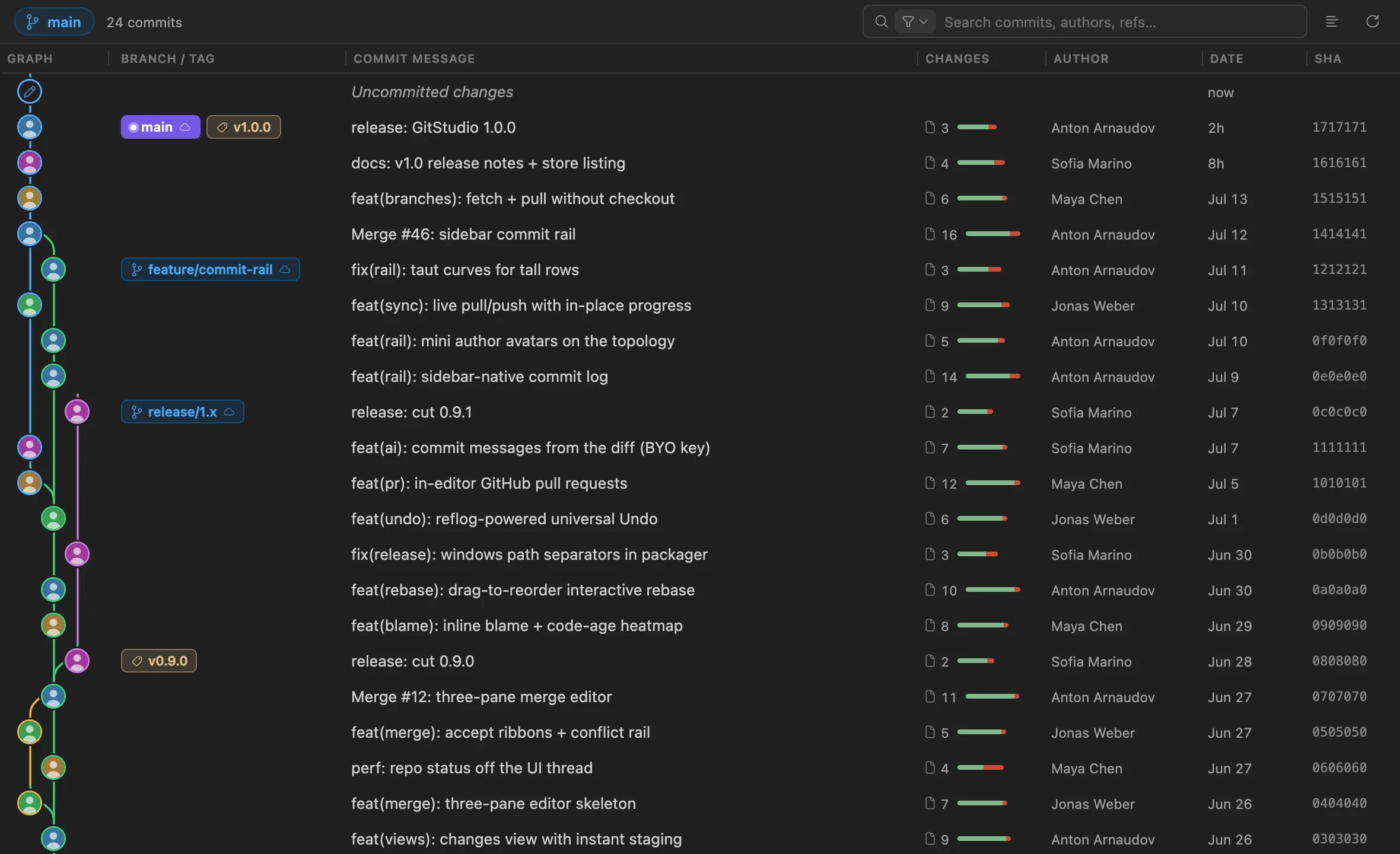
The graph is virtualized, so it stays responsive on large repositories. Colored lanes, ref chips, author avatars on the nodes, and full keyboard navigation. The same engine draws it on the desktop and in the editor.
The graph above is the component that ships in GitStudio, rendering this repository's history. Scroll and click through it.
Also in your editor
The same engine that runs the desktop app ships as two open-source extensions — the full Git workflow and a dedicated merge editor — for VS Code, Cursor, and every VS Code-compatible editor.
The full Git workflow, inside your editor.
156 installs on Open VSX

A focused three-pane merge and conflict editor.
852 installs on Open VSX
Runs in VS Code, Cursor, VSCodium, Windsurf, and code-server. VS Code installs from the Marketplace, the rest from Open VSX.
02 · Merge
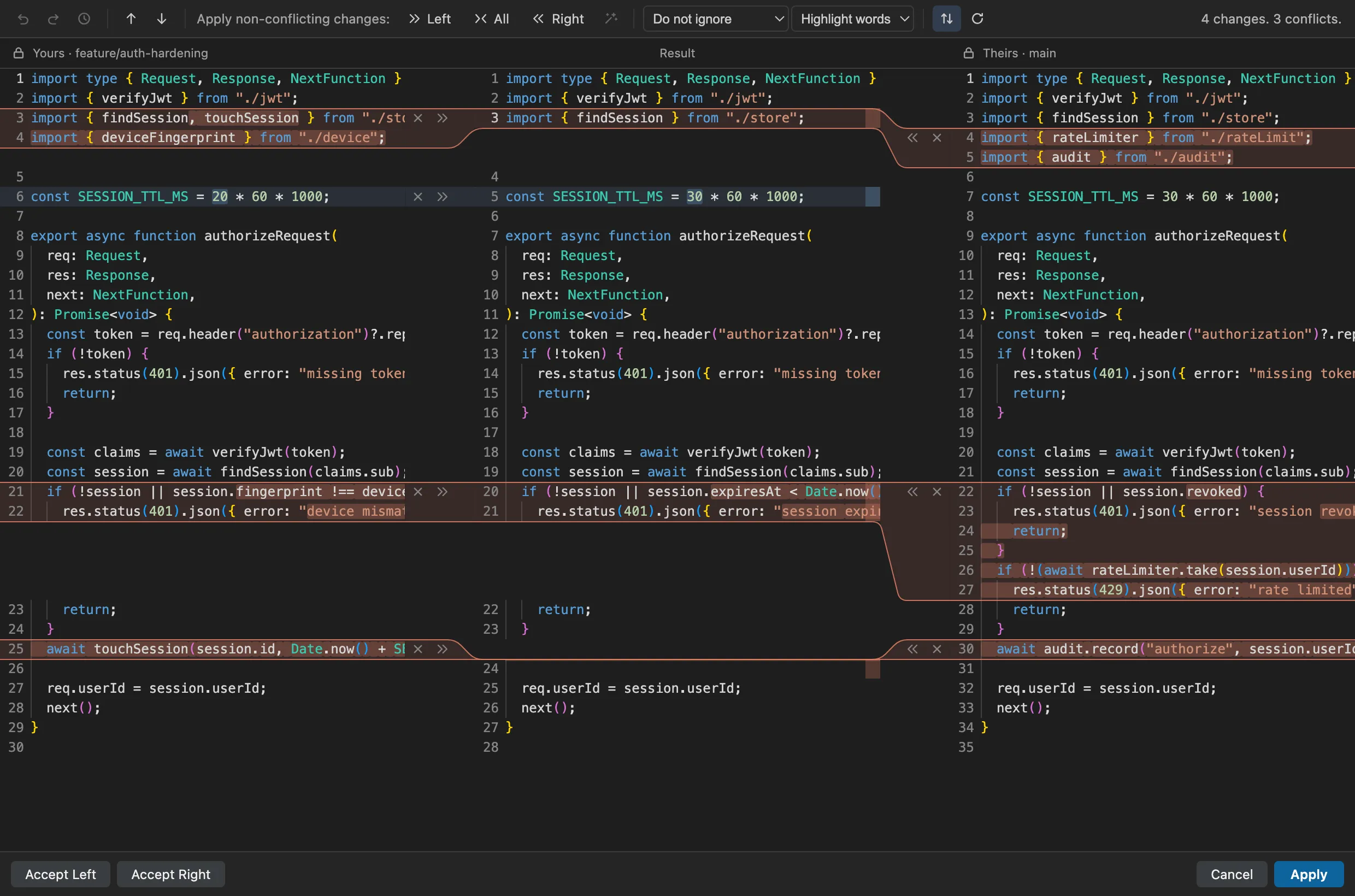
Yours, result, and theirs, side by side, with per-hunk accept controls. A conflict opens the editor automatically. The same merge engine ships in the desktop app, the GitStudio extension, and Merge Studio.
03 · Everyday Git
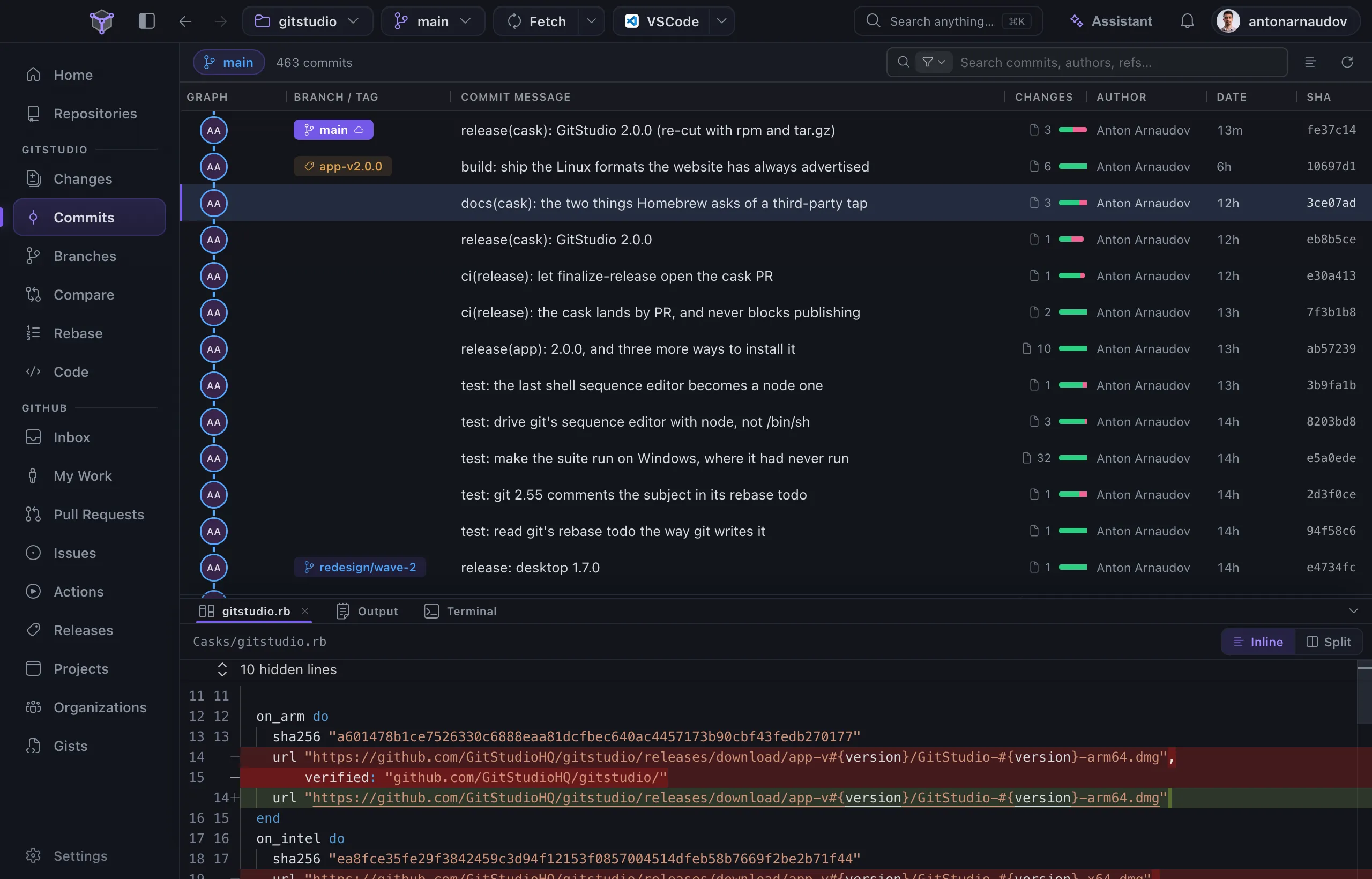
Home is a workbench: the open repository with Push and Fetch, what is waiting to push, and a Needs You card across every repository. Repositories tracks your folders and groups them by where each one lives.
Reorder commits by dragging them: pick, reword, edit, squash, fixup, drop.
Every destructive operation writes a reflog snapshot first, so one command restores it. It is separate from editor undo.
Per-line authorship, plus a code-age heatmap that shades recent lines warm and old lines cool.
A table of branches — creator, contributors, tracking state, age — with the same for remote branches, and tags that say who cut them. Stashes and worktrees with full operations.
A real PTY, not an emulation. Every command becomes a block that records its output, exit code, and timing — scan, copy, or rerun any of them.
04 · GitHub
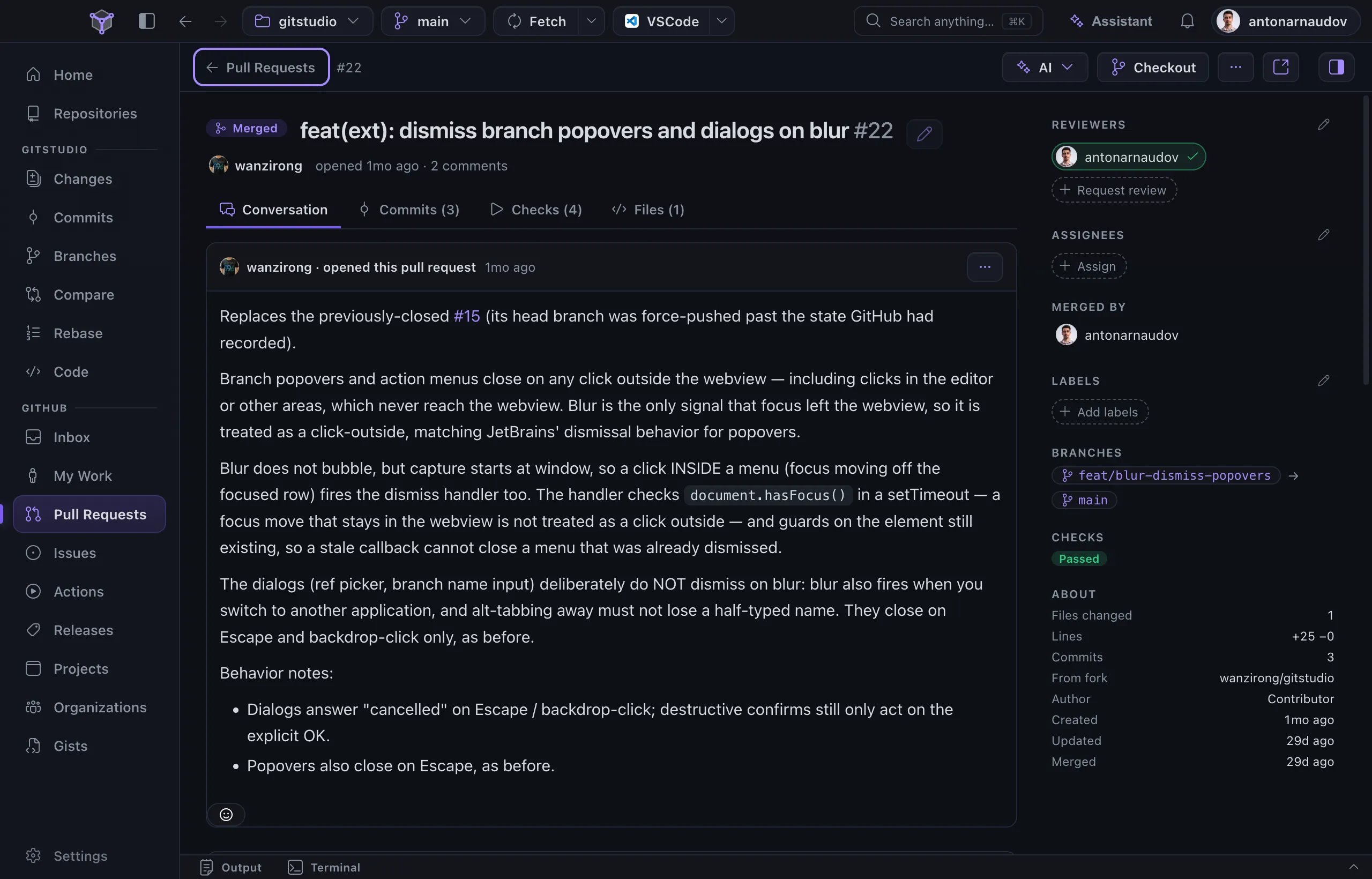
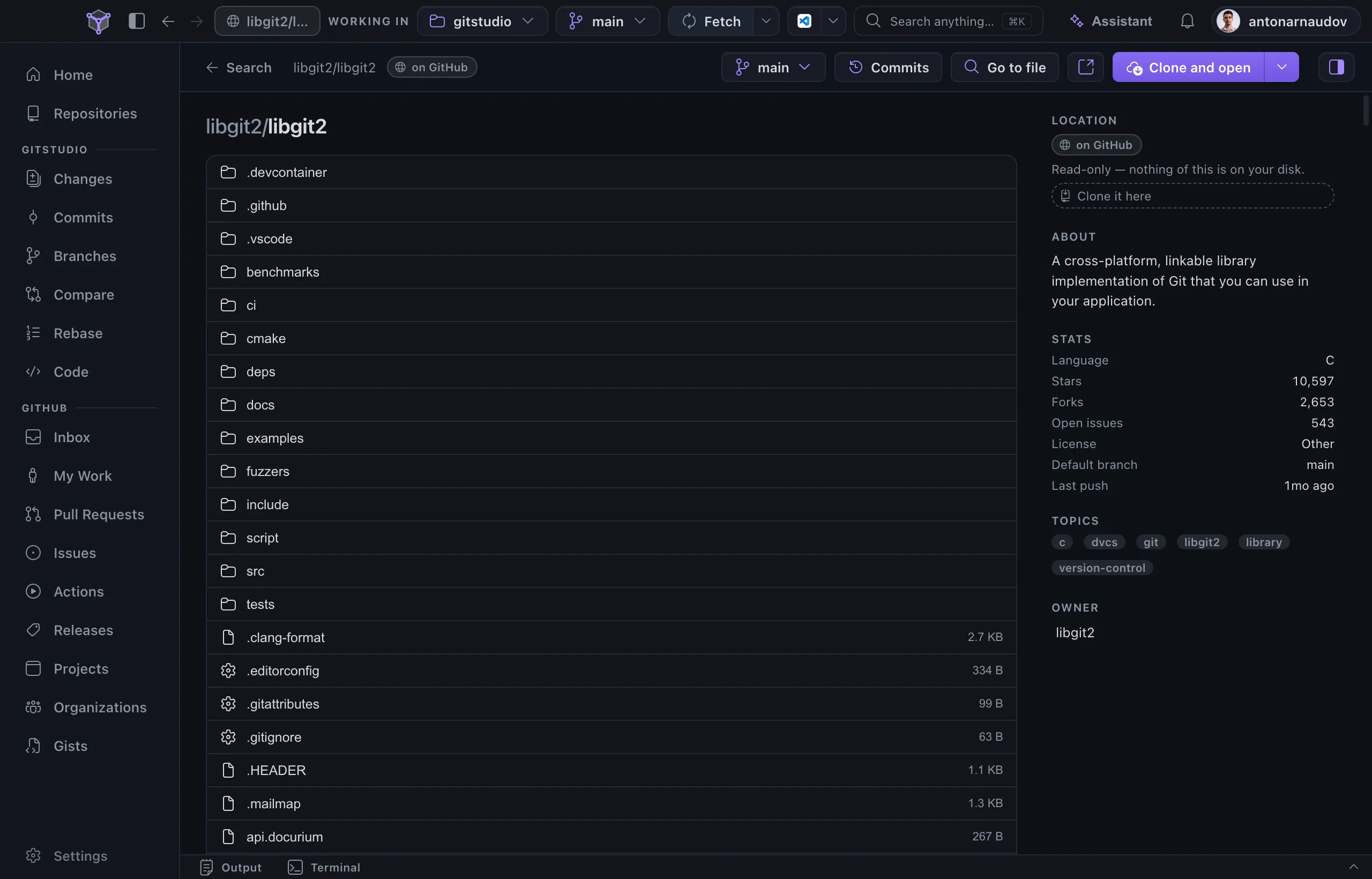
Issues and pull requests are full-width lists that open into full-page details with a property rail. Review a pull request: check it out, comment on lines, and post the comments with your verdict as one review. Read any GitHub repository without cloning it. Every list says where a repository is — on this machine, or on GitHub. Inbox, Actions, releases, projects, organizations, and gists are native views too.
05 · Assistant · optional
The assistant is off until you connect a model. It runs on your own API keys across ten cloud providers, on the Claude Code, Codex or Gemini CLI you already have, or locally through Ollama and LM Studio. It reads real status, diffs, and history, and asks before every write. A built-in MCP server exposes the same tools to other agents.
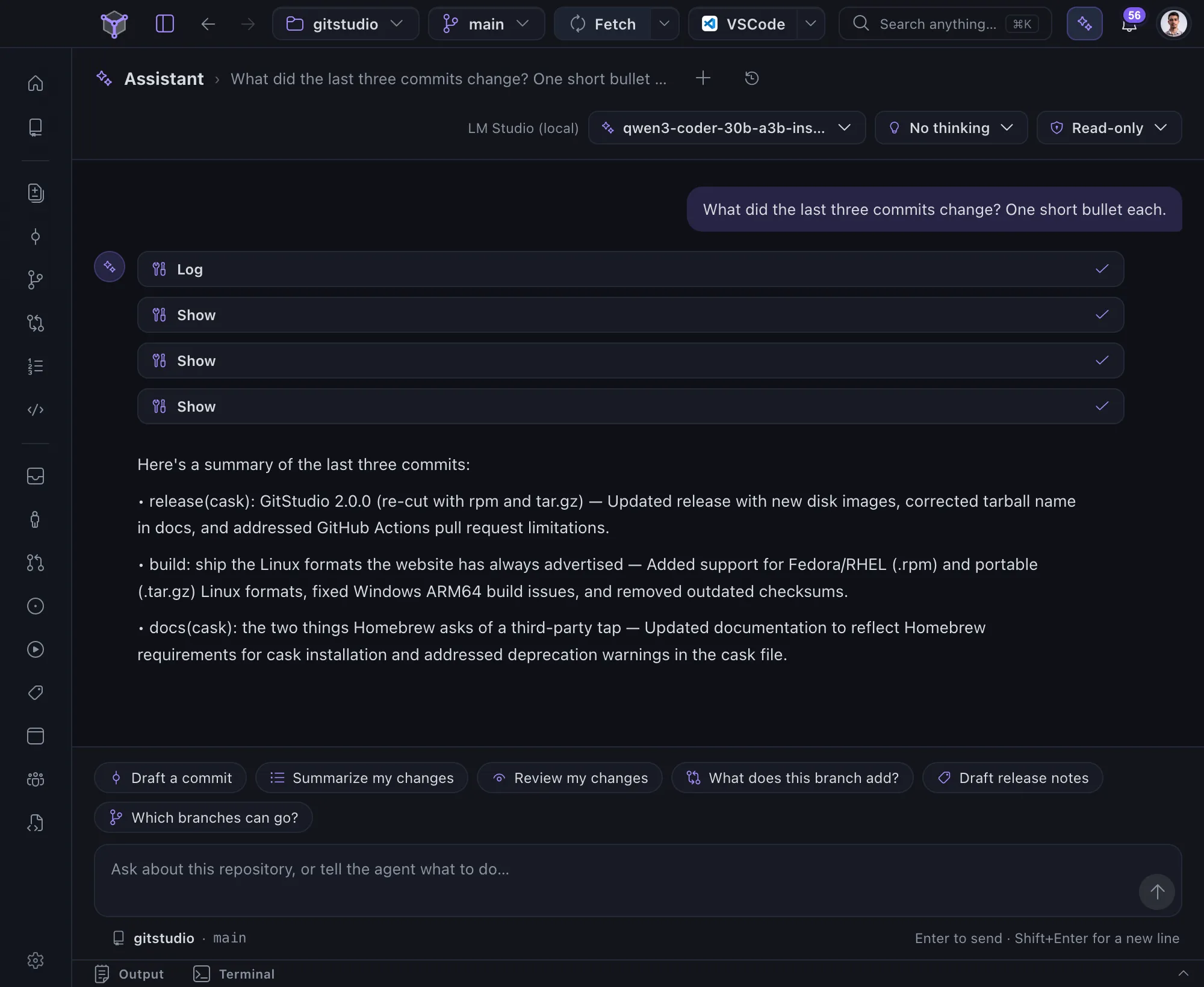
Anthropic, OpenAI, Gemini, and 7 more cloud providers — the Claude Code, Codex and Gemini CLIs you already have — and local models through Ollama and LM Studio.
Install · v2.0.2
macOS, Linux and Windows — free and open source. No account, no license key, nothing to activate.
curl -fsSL https://gitstudio.dev/install.sh | bashor with Homebrew:
brew install --cask gitstudiohq/gitstudio/gitstudiograbbed the .dmg? clear Gatekeeper once:
xattr -d -r -s com.apple.quarantine /Applications/GitStudio.appmacOS 11 or later · Apple Silicon & Intel
curl -fsSL https://gitstudio.dev/install.sh | bashgrabbed the AppImage yourself? make it executable:
chmod +x GitStudio-*.AppImagex86-64 · glibc 2.35+ (Ubuntu 22.04, Debian 12 or newer) · the AppImage needs libfuse2, the packages do not
irm https://gitstudio.dev/install.ps1 | iexgrabbed the .exe? SmartScreen will warn once — “More info” → “Run anyway”.
Windows 10 / 11 · x64
The builds are not code-signed yet — certificates are on the list. Every installer is built by CI from the public repository and lands on the releases page with SHA256SUMS.txt beside it; the one-line installers verify against it and refuse to install on a mismatch. Every build, the checksums, and the extension →
How it compares
A feature-by-feature comparison with GitKraken, GitLens, and the built-in Git tools.
| Capability | GitStudio | GitKraken | GitLens | Built-in Git |
|---|---|---|---|---|
| Native desktop app | Free | Paid | — | — |
| Commit graph on private repos | Free | Paid | Pro | — |
| Three-pane merge editor | Yes | Yes | Uses built-in | Basic |
| Full GitHub client in-app | Yes | Yes | Companion ext | Companion ext |
| Universal undo for Git operations | Yes | Yes | — | — |
| AI on your own keys | Yes | Account + cloud | Pro / cloud | Copilot sub |
| Local-model AI | Ollama, LM Studio | — | — | — |
| Also a VS Code / Cursor extension | Yes | — | Yes | Yes |
| Open source | Apache-2.0 | Closed | Open-core | MIT |
| Account required | No | Yes | For Pro | No |
| Price for the full feature set | $0 | Subscription | Subscription | $0 |
Reflects each product's publicly documented behavior as of July 2026. Plans change, so check their pricing pages. Found an error? File an issue and we'll correct it.
FAQ
Yes. The desktop app and both extensions are free on public and private repositories, with no account and no paid tier. The desktop app and the GitStudio extension are Apache-2.0; Merge Studio is MIT.
Your code, no. Git runs locally, GitHub calls go straight to GitHub with your own sign-in, and there is no usage tracking. The one thing the app sends is an anonymous crash report when something fails: the shape of the error, scrubbed of paths, names, and code. Help → Send Anonymous Crash Reports turns it off. The assistant is off until you connect a model, and with a local model through Ollama or LM Studio, nothing leaves your machine.
VS Code, Cursor, VSCodium, Windsurf, and code-server. VS Code installs from the Marketplace; the others install the same build from Open VSX. See the extensions for details.
No. There is no GitStudio account. You sign in to GitHub with your own credentials only when you use the GitHub features.
You add your provider's API key, and requests go from your machine to that provider. You pay the provider directly at their rates. GitStudio takes no cut and runs no proxy. Local models through Ollama or LM Studio cost nothing.
They are built by CI from the public source and attached to the GitHub release with a SHA256SUMS.txt; the one-line installers verify against it and refuse to install on a mismatch. The builds are not code-signed yet. On Windows, SmartScreen warns on first launch (More info → Run anyway). On recent macOS a quarantined copy is refused as damaged, so the install script and the Homebrew cask clear the quarantine flag for you; a direct .dmg needs one xattr command, shown on the download page. You can verify the checksums yourself, or build from source.
It checks GitHub Releases for a new version and tells you; nothing downloads until you say so. On Windows, and on Linux with the AppImage, it downloads the update and restarts into it. On macOS the build is unsigned, so it downloads the new .dmg to your Downloads folder and opens it — one drag to Applications.
Download
Native installers for macOS, Windows, and Linux, or one command in a terminal. The desktop app and the GitStudio extension are Apache-2.0, Merge Studio is MIT, and private repositories work exactly like public ones — free, no account.