
Merge Studio extension
A three-pane editor for merge conflicts.
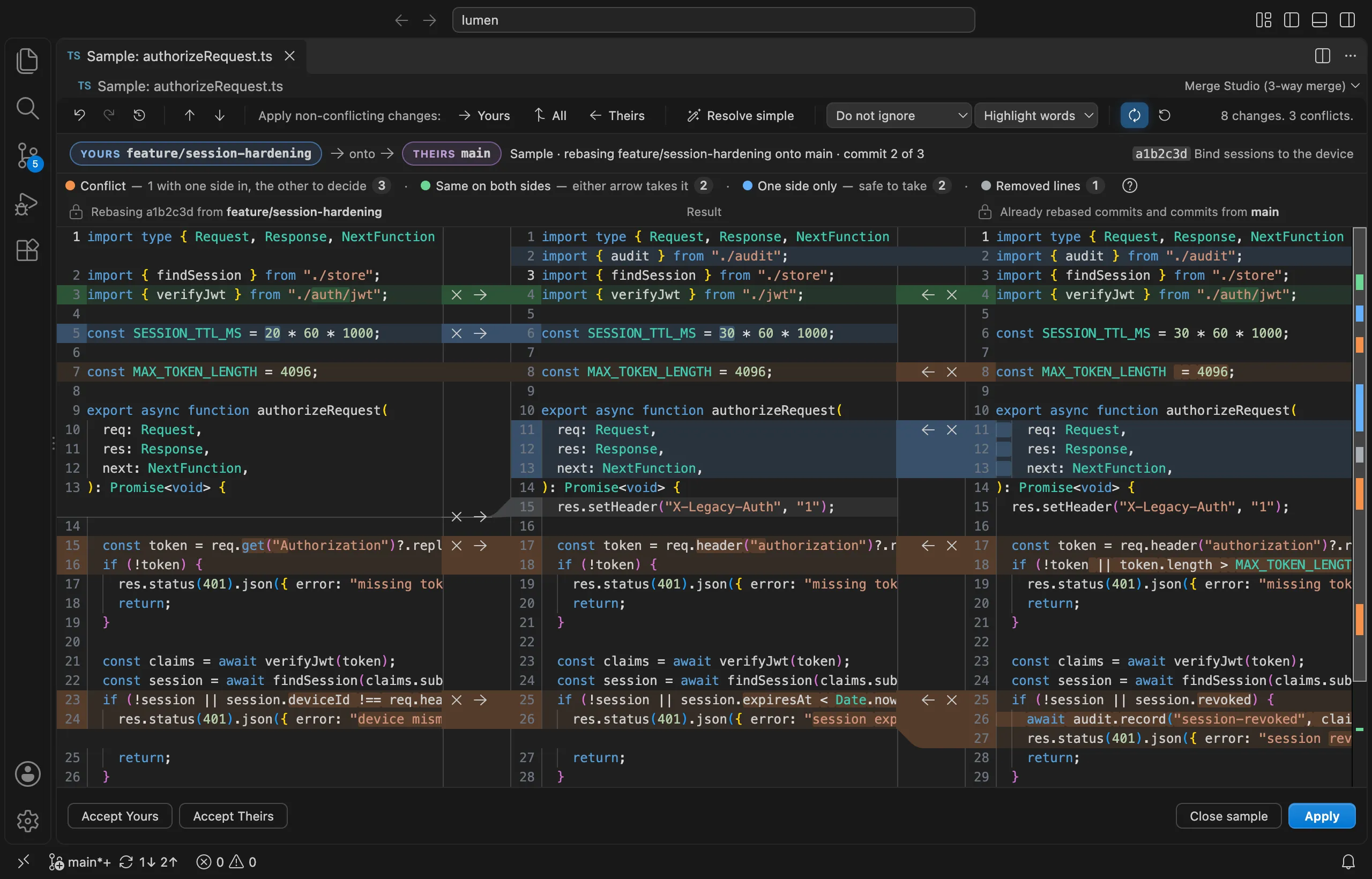
Yours, the result, and theirs, side by side, every change coloured by the decision it needs. When a merge or rebase stops on conflicts, the dashboard opens with every file, and a named undo history lets you step back through every decision you make.

v1.4.1694 installs4,131 downloads★ 5.0MIT + Apache-2.0Source on GitHub
Runs in VS Code, Cursor, VSCodium, Windsurf, and code-server.
What you get
What Merge Studio does.
Three panes, zero guessing
Yours on the left, the file you will commit in the middle, theirs on the right, joined by ribbons you click to take a change. You always see where a change came from and where it lands.
A conflicts dashboard
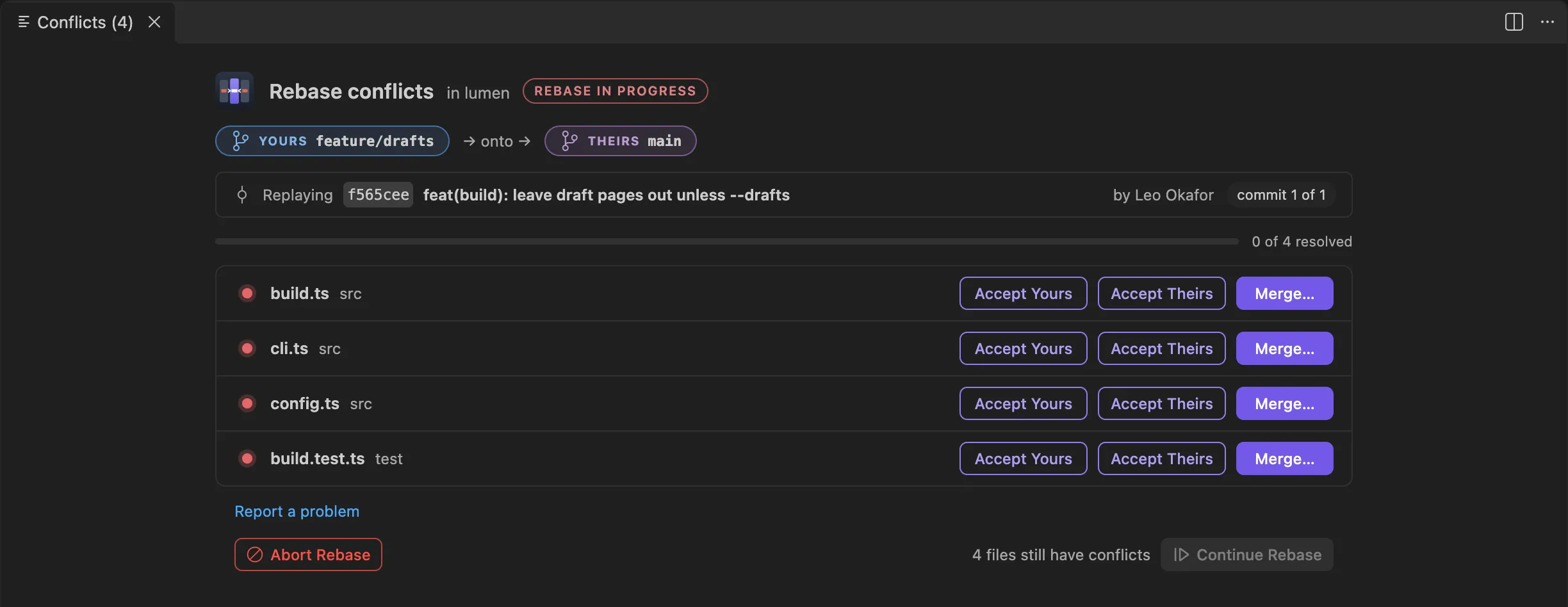
Every conflicted file with Accept Yours, Accept Theirs, and Merge…, and Continue, Skip, and Abort for the merge, rebase, or cherry-pick itself. It says which side is which, and which commit is being replayed.
Undo that remembers names
A named undo/redo history for the whole resolution session. Step back through decisions, not keystrokes, or hold Undo on a resolved file to get its conflict back.
A precise diff
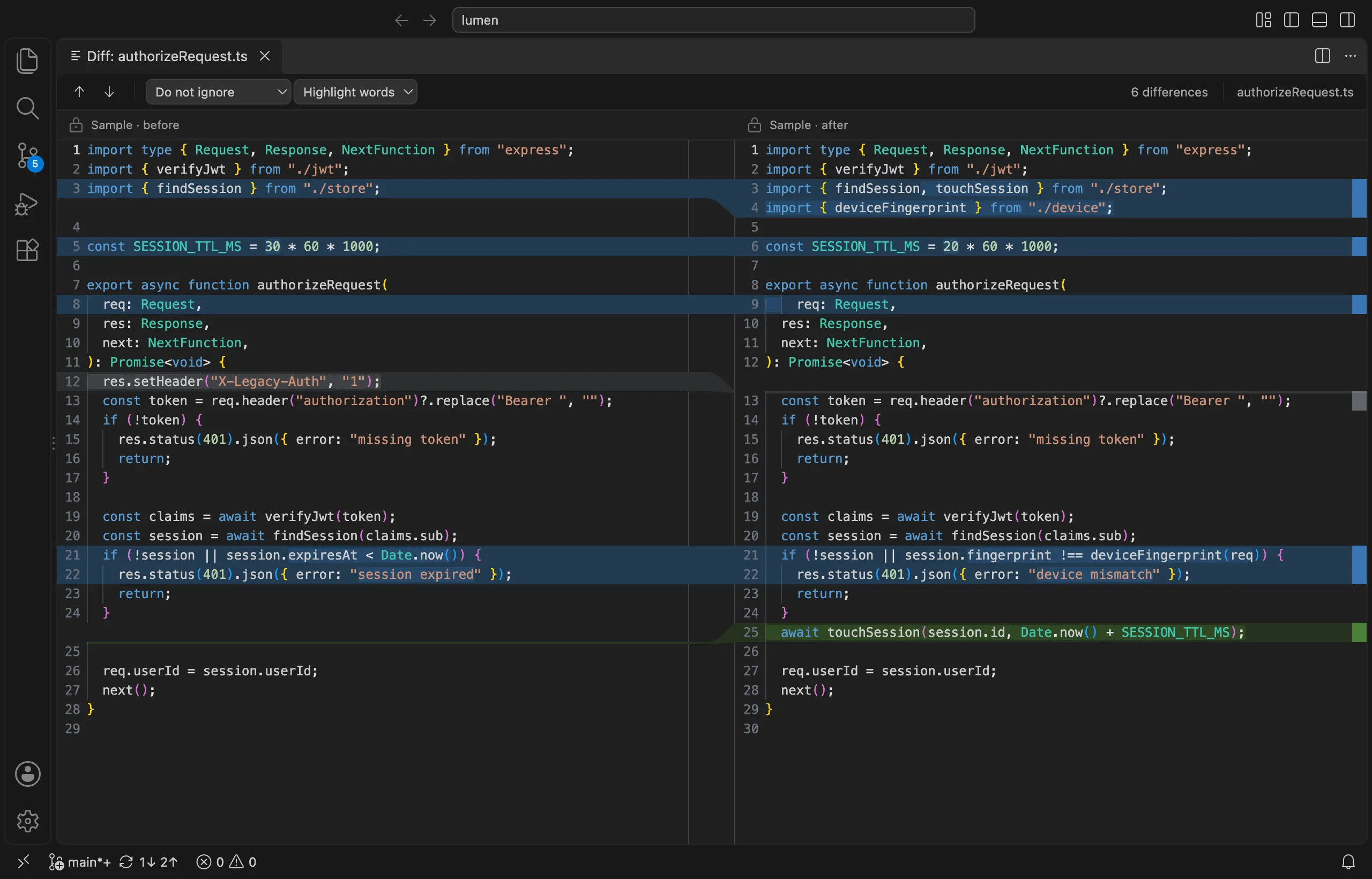
Compare two files, or a file with its last commit, side by side with the changed words highlighted. Stage a file one change at a time with ticks.
Rebases that make sense
Git swaps ours and theirs during a rebase. Merge Studio does not: Yours is always your own commit, on the left, and the header says which branch is landing where.
Focused
Merge Studio does one job and stays out of your way, in VS Code, Cursor, VSCodium, Windsurf, and code-server. Run Open Sample Merge to try it without touching a repository.
Mid-merge control
A dashboard that tracks every conflict.
A merge with nine conflicted files shouldn't live in your head. The dashboard tracks every conflicted file, what's resolved, and what's left — with per-file actions and a named undo history for the whole session. Abandon ship or continue, always knowing exactly where you stand.
- Opens the moment a merge, rebase, cherry-pick, revert, git am, or stash pop stops on conflicts
- Continue says why when it can't run yet, and Abort and Skip ask first
- Binary and deleted-on-one-side files get the choices that make sense: keep yours, keep theirs, or delete
The diff
A side-by-side diff with intra-line highlighting.
Intra-line highlighting shows exactly which words changed, change navigation steps you through the file, and very large files fall back to a mode that stays fast.
Install
Install for your editor.
Search “Merge Studio” in your editor's Extensions view, or grab the command below. Requires VS Code 1.82 or newer, or any editor built on it.
Merge Studio in VS Code
MarketplaceSearch “Merge Studio” in the Extensions view, or run:
code --install-extension gitstudio.merge-studioMerge Studio in Cursor
Open VSXCursor installs from Open VSX. Search “Merge Studio” in Extensions, or run:
cursor --install-extension gitstudio.merge-studioMerge Studio in VSCodium
Open VSXVSCodium installs from Open VSX. Search “Merge Studio” in Extensions, or run:
codium --install-extension gitstudio.merge-studioMerge Studio in Windsurf
Open VSXWindsurf installs from Open VSX. Search “Merge Studio” in Extensions, or run:
windsurf --install-extension gitstudio.merge-studioMerge Studio in code-server
Open VSXInstall from the Extensions view (code-server reads Open VSX), or from a shell:
code-server --install-extension gitstudio.merge-studioThe origin story
Where GitStudio started.
Merge Studio came first — a single, obsessive answer to the worst five minutes of any workday. Its pure, unit-tested merge engine grew into @gitstudio/engine, the core that now powers the whole suite. Since 1.0, Merge Studio is built on the same merge editor and conflicts dashboard as the GitStudio extension and GitStudio Desktop, so a fix in one reaches both. The products stay separate on purpose —they share an engine, not a listing.
Which one should I install?
Just want better merges? Merge Studio. It does exactly that.
Want the whole workflow — graph, blame, staging, rebase, PRs, and the same three-pane merge? The GitStudio extension. You don't need both; GitStudio includes the merge editor and the dashboard.